接着前面的使用“插件”模式定制皮肤(一)来讲,我们可以顺着这个思路来做一个定制皮肤功能的apk。
Android中的theme概念并不是真正的系统主题,我认为的系统主题的定义是,系统图标可以通过一种主题文件进行切换。设计思路是把每一种主题文件作为一个插件,也就是所谓的apk文件,我们可以在这个apk文件中定义我们想要的风格样式,然后通过我们的软件来引用该apk文件中资源文件来达到切换主题的目的。

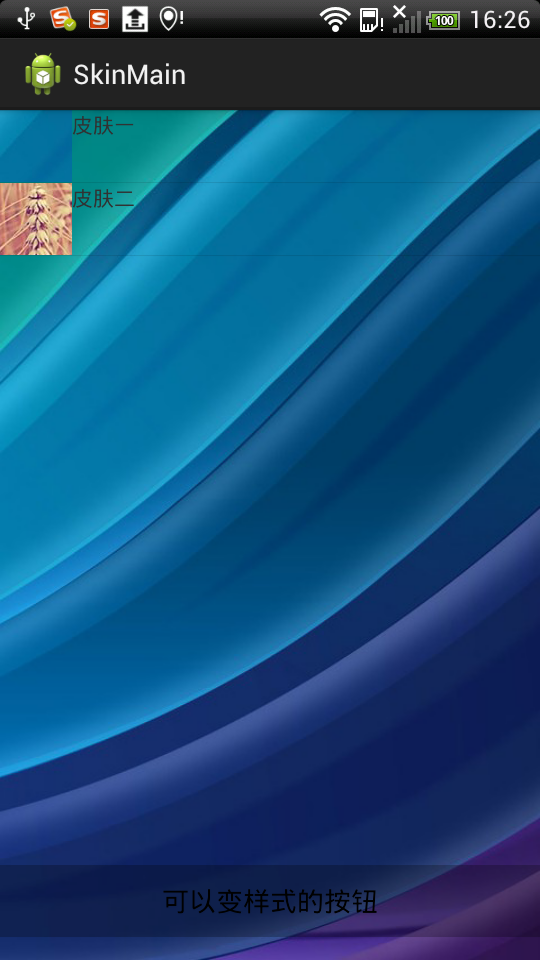
接下来我们要做的是自定义两种皮肤,也就是两个apk,SkinCustom1和SkinCustom2,我们的主apk是SkinMain。下面我们开始写代码,首先新建工程SkinCustom1,这里我们引入plugin.jar包,这个jar包其实是在SkinCustom中定义的,这里作为library导入进来,上一节中已经介绍过了如何导入,新建类SelectSkin,如下:
package com.ldw.skincustom1;

import android.content.Context;
import android.content.pm.PackageManager;
import android.content.pm.PackageManager.NameNotFoundException;
import android.content.res.Resources;
import android.graphics.drawable.Drawable;

import com.ldw.skinmain.IPlugin;

public class SelectSkin implements IPlugin {

	private Context mContext;

	@Override
	public String getString(String packageName) {
		if(mContext == null) {
			throw new IllegalArgumentException("you should invoke setContext first!");
		}
		try {
			PackageManager mPm = mContext.getPackageManager();
			Resources res = mPm.getResourcesForApplication(packageName);
			int id = res.getIdentifier("app_name", "string", packageName);
			return res.getString(id);
		} catch (NameNotFoundException e) {
			e.printStackTrace();
		}
		return "";
	}

	@Override
	public Drawable getDrawable(String name, String packageName) {
		if(mContext == null) {
			throw new IllegalArgumentException("you should invoke setContext first!");
		}
		try {
			PackageManager mPm = mContext.getPackageManager();
			Resources res = mPm.getResourcesForApplication(packageName);
			int id = res.getIdentifier(name, "drawable", packageName);
			return res.getDrawable(id);
		} catch (NameNotFoundException e) {
			e.printStackTrace();
		}
		return null;
	}

	@Override
	public void setContext(Context context) {
		this.mContext = context;
	}

}
类中具体的方法作用我就不解释了,实现了接口中的三个方法,setContext,getDrawable,getString。再看Manifest文件,如下:
<?xml version="1.0" encoding="utf-8"?>
<manifest xmlns:android="http://schemas.android.com/apk/res/android"
    package="com.ldw.skincustom1"
    android:versionCode="1"
    android:versionName="1.0" >

    <uses-sdk
        android:minSdkVersion="8"
        android:targetSdkVersion="17" />

    <application
        android:icon="@drawable/icon"
        android:label="@string/app_name" >
        <activity
            android:name="com.ldw.skincustom1.MainActivity"
            android:label="@string/app_name" >
            <intent-filter>
                <action android:name="com.ldw.skin"/>
            </intent-filter>
        </activity>
    </application>

</manifest>
注意我们的MainActivity并没有做任何事情,只是加了一个action而已,这样的话我们的主apk中就可以通过PackageManager类的queryIntentActivity()方法查询相关的插件程序列表了,同样的我们新建工程SkinCustom2,该工程和SkinCustom1差不多,只是资源文件更改了,等会附件中会有具体的工程。
接着我们来看我们的主工程SkinMain:
IPlugin.java接口:
package com.ldw.skinmain;

import android.content.Context;
import android.graphics.drawable.Drawable;

public interface IPlugin {

	public void setContext(Context context);
	public String getString(String packageName);
	public Drawable getDrawable(String name, String packageName);

}
MainActivity类:
package com.ldw.skinmain;

import java.lang.reflect.Method;

public class MainActivity extends Activity implements OnItemClickListener {

	private List<ResolveInfo> mRlist;
	private ListView mListView;
	private PackageManager mPm;

	private RelativeLayout mMainLayout;
	private Button mButton;

	@Override
	protected void onCreate(Bundle savedInstanceState) {
		super.onCreate(savedInstanceState);
		setContentView(R.layout.activity_main);

		searchSkin();
		initView();
		initListView();
	}

	private void searchSkin() {
		Intent intent = new Intent("com.ldw.skin", null);
		mPm = getPackageManager();

		mRlist = mPm.queryIntentActivities(intent, 0);
	}

	private void initView() {
		mMainLayout = (RelativeLayout) findViewById(R.id.mainlayout);
		mButton = (Button) findViewById(R.id.button);
	}

	private void initListView() {
		mListView = (ListView) findViewById(R.id.listview);
		mListView.setAdapter(new MyAdapter());
		mListView.setOnItemClickListener(this);
	}

	private class MyAdapter extends BaseAdapter {

		@Override
		public int getCount() {
			return mRlist.size();
		}

		@Override
		public ResolveInfo getItem(int position) {
			return mRlist.get(position);
		}

		@Override
		public long getItemId(int position) {
			return position;
		}

		@Override
		public View getView(int position, View convertView, ViewGroup parent) {

			ViewHolder holder;
			ResolveInfo info = getItem(position);
			if (convertView == null) {
				convertView = getLayoutInflater().inflate(R.layout.item, null);
				holder = new ViewHolder();
				holder.iv = (ImageView) convertView.findViewById(R.id.item_iv);
				holder.tv = (TextView) convertView.findViewById(R.id.item_tv);
				convertView.setTag(holder);
			} else {
				holder = (ViewHolder) convertView.getTag();
			}

			IPlugin plugin = getPlugin(info);
			holder.iv
					.setBackgroundDrawable(plugin.getDrawable("icon", info.activityInfo.packageName));
			holder.tv.setText(plugin.getString(info.activityInfo.packageName));

			return convertView;
		}

		class ViewHolder {
			TextView tv;
			ImageView iv;
		}
	}

	@SuppressLint("NewApi")
	private IPlugin getPlugin(ResolveInfo rinfo) {
		ActivityInfo ainfo = rinfo.activityInfo;

		String packageName = ainfo.packageName;
		// 目标类所在apk或jar包文件的路径
		String dexPath = ainfo.applicationInfo.sourceDir;
		// 由于dex文件存在apk中,因此在装载目标类之前需要先从apk中解压出dex文件,这个参数就是解压后存放的路径
		String dexOutputDir = getApplicationInfo().dataDir;
		// 指目标类中所使用的C/C++库存放的路径
		String libPath = ainfo.applicationInfo.nativeLibraryDir;

		DexClassLoader cl = new DexClassLoader(dexPath, dexOutputDir, libPath,
				this.getClass().getClassLoader());
		try {
			Class<?> clazz = cl.loadClass(packageName + ".SelectSkin");
			// 获取真正的PluginClass对象
			IPlugin plugin = (IPlugin) clazz.newInstance();
			plugin.setContext(this);
			return plugin;
		} catch (Exception e) {
			Log.i("Host", "error", e);
		}
		return null;
	}

	@SuppressWarnings("deprecation")
	@Override
	public void onItemClick(AdapterView<?> parent, View arg1, int position,
			long arg3) {
		ResolveInfo info = (ResolveInfo) parent.getItemAtPosition(position);
		IPlugin plugin = getPlugin(info);
		mMainLayout.setBackgroundDrawable(plugin.getDrawable("bg",
				info.activityInfo.packageName));
		mButton.setBackgroundDrawable(plugin.getDrawable("button_selector",
				info.activityInfo.packageName));
	}
}
没什么好讲的,大家好好看看代码应该能看懂的。下面是工程代码。
点击下载工程。
写得不错
嘿嘿。。。
这个名字太难听了,病人!!!!!
写的太好了,[good],我得好好学习下