最近在看Cyril Mottier(公认的安卓开发大牛)大神的博客的时候看到了一篇文章,是介绍他们公司研发的CapitaineTrain(欧洲一款很受欢迎的铁路购票客户端)项目中实现的一个比较酷的效果。先上两张效果图
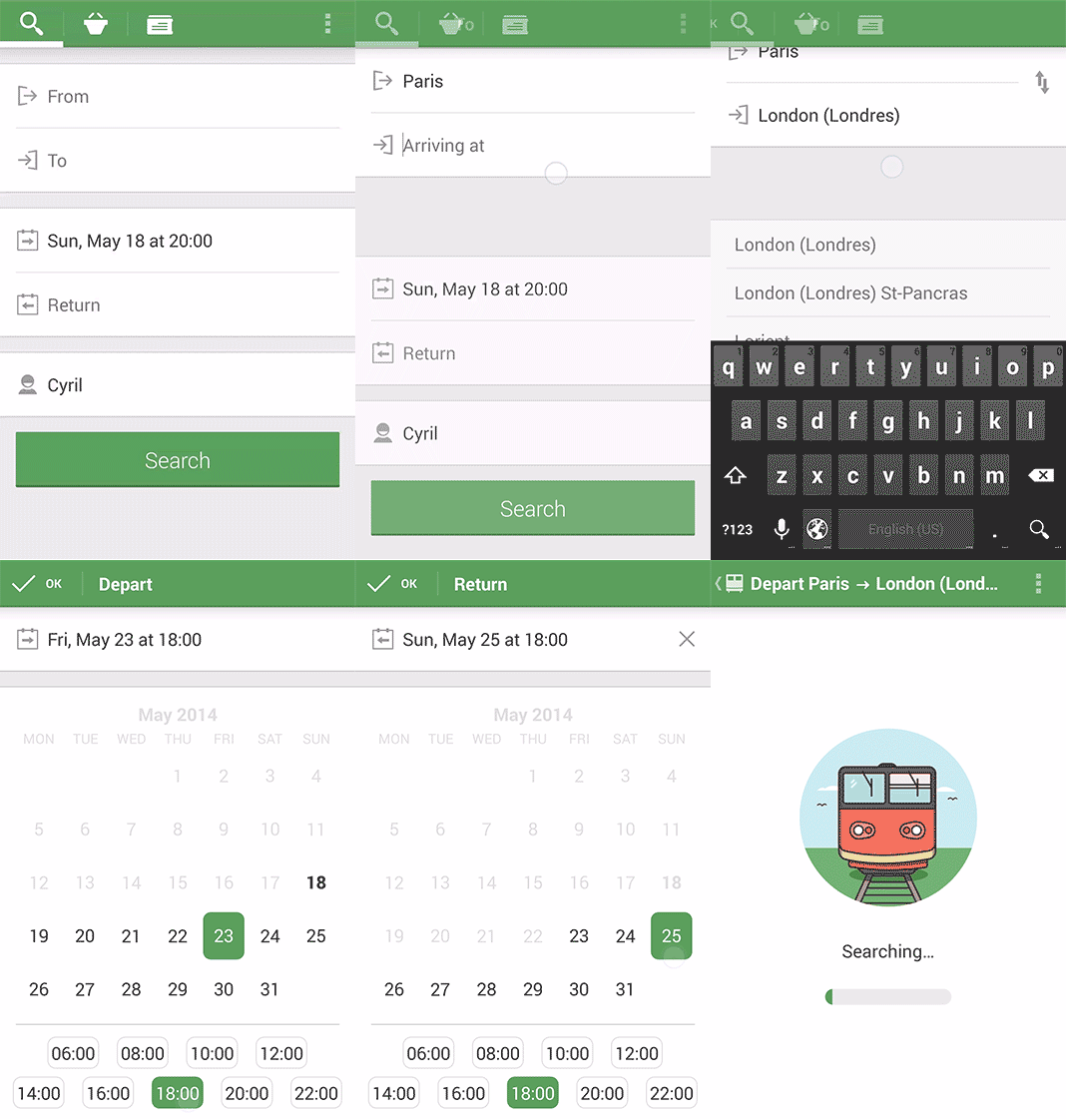
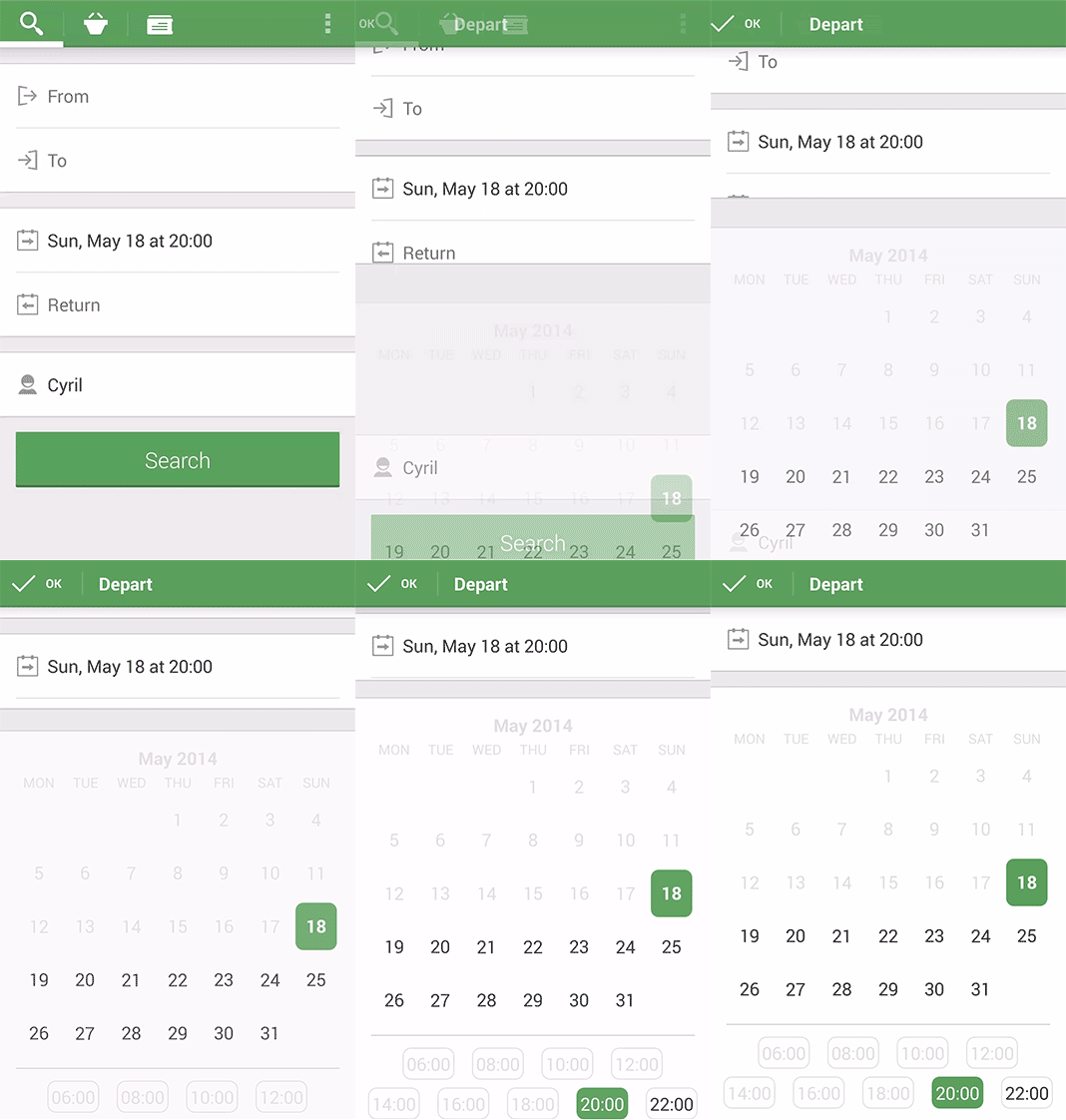
效果是不是很酷!从GooglePlay下载了CapitaineTrain安装后看了下操作,整个软件非常简洁,操作性特别强,人性化,动画流畅,比我国某铁的购票客户端强的太多了。是不是迫不及待的想实现这个效果?那就跟着我一起来做~
这个是原博客地址:http://cyrilmottier.com/2014/05/20/custom-animations-with-fragments/
起初只是想简单的实现下动画切换的效果,但是使用过Cyril大神开发的CapitaineTrain后感觉界面太清爽了,感叹安卓也能做出如此流畅的动画(这里肯定会有很多人说我太菜了~~~)!我这个人有个缺点,就是每当看到一个软件某个效果很好时就迫不及待的想去实现,另外说下我这个人有强迫症,如果是模仿的话也要尽量跟原客户端保持一致的效果,这款软件也不例外~花了一个多星期终于实现了自己想要的效果。由于我机器的安卓模拟器太卡了也就没有录制gif,跟上面的效果差不多。下面是我做的一个效果,只是静态图
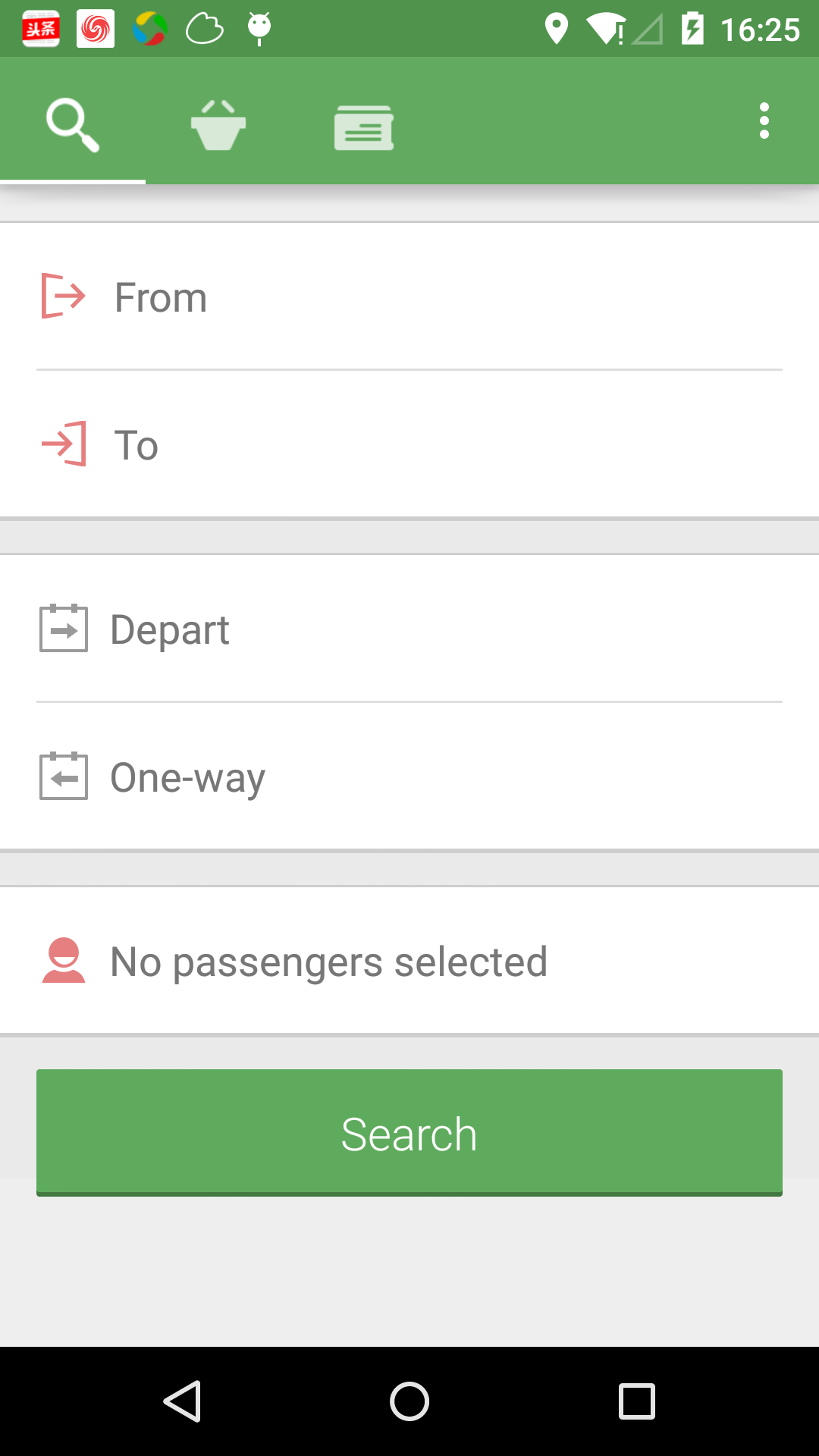
我的实现步骤是这样的:首先是软件顶部导航的实现,然后是导航栏下面的布局实现,最后是动画的实现。
1、导航栏的实现
导航栏采用的是ActionBar来实现的,之前一直都用的自定义LinearLayout或者RelativeLayout来实现的,试着来实现一把。
其实5.0版本之后推出了ToolBar这个控件,跟ActionBar差不多,这里就不作介绍了。
导航栏分为这几个部分:导航栏和状态栏的颜色、导航栏左边的三个图标、图标下方的指示条、右边的Menu按钮。
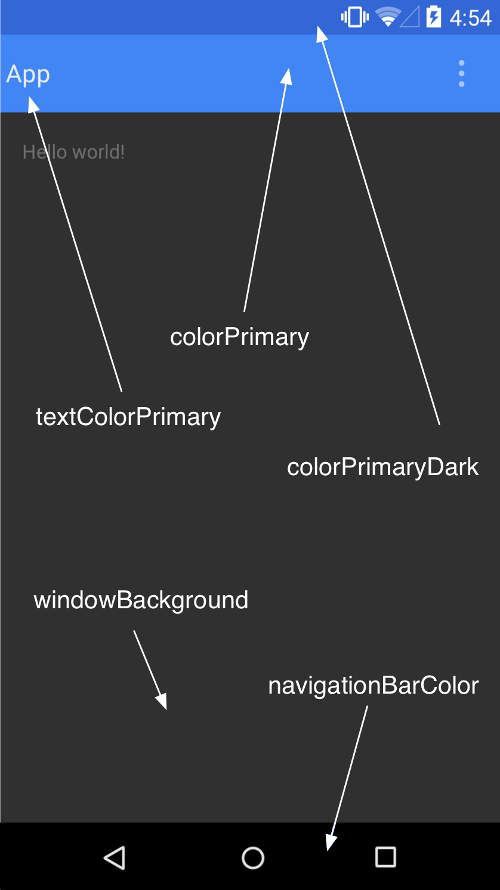
(1)导航栏和状态栏的颜色
下面是我反编译CapitaineTrain后拿出来的资源文件(提起反编译感觉有点不太厚道):
<style name="Base.Theme.CapitaineTrain" parent="@style/Theme.AppCompat.Light.DarkActionBar">
    ......
    <item name="colorPrimary">@color/ct_green</item>
    <item name="colorPrimaryDark">@color/ct_dark_green</item>
    ......
</style>
colorPrimary属性定义了导航栏的颜色,colorPrimaryDark是5.0以后Material Design才有的属性,请看下面一张图
写好style之后别忘了在Manifest中应用该样式
<application
        android:allowBackup="true"
        android:icon="@drawable/ic_launcher"
        android:label="@string/app_name"
        android:theme="@style/Base.Theme.CapitaineTrain" >
        <activity
            android:name="com.ldw.capitainetrain.ui.MainActivity"
            android:label="@string/app_name"
            android:theme="@style/Theme.CapitaineTrain.EmptyActionBar.NoInset" >
            <intent-filter>
                <action android:name="android.intent.action.MAIN" />

                <category android:name="android.intent.category.LAUNCHER" />
            </intent-filter>
        </activity>
    </application>
至于关于MaterialDesign的一些设计大家可以参考http://www.google.com/design/spec/style/color.html#
(2)导航栏左边三个icon和底部指示条的实现
本来是想自己修改下PagerSlidingTabStrip这个开源控件,但在github上无意中看到了https://github.com/Mirkoddd/TabBarView这个开源控件就直接拿过来用了,但是我也做了些许修改,包括指示条的高度,去掉icon中间的分割线,icon选中时的状态标识,icon长按时的Toast提示。下面上代码:
TabBarView类
package com.ldw.capitainetrain.view;

import android.annotation.SuppressLint;
import android.content.Context;
import android.content.res.Configuration;
import android.graphics.Canvas;
import android.graphics.Color;
import android.graphics.Paint;
import android.support.v4.view.ViewPager;
import android.support.v4.view.ViewPager.OnPageChangeListener;
import android.util.AttributeSet;
import android.view.View;
import android.view.ViewTreeObserver.OnGlobalLayoutListener;
import android.widget.LinearLayout;

import com.ldw.capitainetrain.R;

public class TabBarView extends LinearLayout {
    public interface IconTabProvider {
        public int getPageIconResId(int position);
    }

    private static final int STRIP_HEIGHT = 2;

    public final Paint mPaint;

    private int mStripHeight;
    private float mOffset = 0f;
    public static int mSelectedTab = 0;
    public ViewPager pager;

    public static int tabCount;
    private final PageListener pageListener = new PageListener();
    public OnPageChangeListener delegatePageListener;

    private TabView child;

    private View nextChild;

    public static int a;

    private Context mContext;

    private int mToolBarHeight;

    public TabBarView(Context context) {
        this(context, null);
    }

    public TabBarView(Context context, AttributeSet attrs) {
        this(context, attrs, android.R.attr.actionBarTabBarStyle);
    }

    public TabBarView(Context context, AttributeSet attrs, int defStyle) {
        super(context, attrs, defStyle);

        mContext = context;

        setWillNotDraw(false);

        mPaint = new Paint();
        mPaint.setColor(Color.WHITE);
        mPaint.setAntiAlias(true);

        mStripHeight = (int) (STRIP_HEIGHT
                * getResources().getDisplayMetrics().density + .5f);

        mToolBarHeight = context.getResources().getDimensionPixelSize(
                R.dimen.toolbar_height);
    }

    public void setStripColor(int color) {
        if (mPaint.getColor() != color) {
            mPaint.setColor(color);
            invalidate();
        }
    }

    public void setStripHeight(int height) {
        if (mStripHeight != height) {
            mStripHeight = height;
            invalidate();
        }
    }

    public void setSelectedTab(int tabIndex) {
        if (tabIndex < 0) {
            tabIndex = 0;
        }
        final int childCount = getChildCount();
        if (tabIndex >= childCount) {
            tabIndex = childCount - 1;
        }
        if (mSelectedTab != tabIndex) {
            mSelectedTab = tabIndex;
            invalidate();
        }
    }

    public void setOffset(int position, float offset) {
        if (mOffset != offset) {
            mOffset = offset;
            invalidate();
        }
    }

    @Override
    protected void onDraw(Canvas canvas) {
        super.onDraw(canvas);
        // Draw the strip manually
        child = (TabView) getChildAt(mSelectedTab);
        int height = getHeight();
        if (child != null) {
            float left = child.getLeft();
            float right = child.getRight();
            if (mOffset > 0f && mSelectedTab < tabCount - 1) {
                nextChild = getChildAt(mSelectedTab + 1);
                if (nextChild != null) {
                    final float nextTabLeft = nextChild.getLeft();
                    final float nextTabRight = nextChild.getRight();
                    left = (mOffset * nextTabLeft + (1f - mOffset) * left);
                    right = (mOffset * nextTabRight + (1f - mOffset) * right);
                }
            }
            canvas.drawRect(left, height - mStripHeight, right, height, mPaint);
        }
    }

    public void setViewPager(ViewPager pager) {
        this.pager = pager;

        if (pager.getAdapter() == null) {
            throw new IllegalStateException(
                    "ViewPager does not have adapter instance.");
        }

        pager.setOnPageChangeListener(pageListener);

        notifyDataSetChanged();
    }

    private class PageListener implements OnPageChangeListener {

        @Override
        public void onPageScrolled(int position, float positionOffset,
                int positionOffsetPixels) {

            mSelectedTab = position;
            mOffset = positionOffset;

            invalidate();

            if (delegatePageListener != null) {
                delegatePageListener.onPageScrolled(position, positionOffset,
                        positionOffsetPixels);
            }
        }

        @Override
        public void onPageScrollStateChanged(int state) {
            if (state == ViewPager.SCROLL_STATE_IDLE) {

            }

            if (delegatePageListener != null) {
                delegatePageListener.onPageScrollStateChanged(state);
            }
        }

        @Override
        public void onPageSelected(int position) {
            if (delegatePageListener != null) {
                delegatePageListener.onPageSelected(position);
            }

            changeIconAlpha(position);

        }
    }

    public void notifyDataSetChanged() {

        this.removeAllViews();

        tabCount = pager.getAdapter().getCount();

        for (int i = 0; i < tabCount; i++) {

            if (getResources().getConfiguration().orientation == Configuration.ORIENTATION_PORTRAIT) {

                addTabViewP(i, pager.getAdapter().getPageTitle(i).toString(),
                        ((IconTabProvider) pager.getAdapter())
                                .getPageIconResId(i));

            } else {

                addTabViewL(i, pager.getAdapter().getPageTitle(i).toString(),
                        ((IconTabProvider) pager.getAdapter())
                                .getPageIconResId(i));

            }
        }

        getViewTreeObserver().addOnGlobalLayoutListener(
                new OnGlobalLayoutListener() {

                    @SuppressLint("NewApi")
                    @Override
                    public void onGlobalLayout() {

                        getViewTreeObserver()
                                .removeOnGlobalLayoutListener(this);

                        mSelectedTab = pager.getCurrentItem();
                        //更改icon的alpha值
                        changeIconAlpha(mSelectedTab);

                    }
                });

    }

    private void changeIconAlpha(int position) {
        int childCount = getChildCount();
        for (int i = 0; i < childCount; i++) {
            TabView tabView = (TabView) getChildAt(i);
            float alpha = 0;
            if (position == i) {
                alpha = 1.0f;
            } else {
                alpha = 0.75f;
            }
            tabView.setIconAlpha(alpha);
        }
    }

    private void addTabViewL(final int i, String string, int pageIconResId) {
        // TODO Auto-generated method stub
        TabView tab = new TabView(getContext());
        // tab.setIcon(pageIconResId);
        tab.setText(string, pageIconResId);
        tab.setOnClickListener(new OnClickListener() {
            @Override
            public void onClick(View v) {
                pager.setCurrentItem(i);
            }
        });

        this.addView(tab);
    }

    @SuppressLint("NewApi")
    private void addTabViewP(final int i, final String string, int pageIconResId) {
        // TODO Auto-generated method stub
        final TabView tab = new TabView(getContext());
        tab.setContentDescription(string);
        tab.setIcon(pageIconResId);
        if (android.os.Build.VERSION.SDK_INT >= 5) {
//			int[] attrs = new int[] { android.R.attr.selectableItemBackground };
//			TypedArray ta = mContext.obtainStyledAttributes(attrs);
//			Drawable drawableFromTheme = ta.getDrawable(0);
//			ta.recycle();
//			tab.setBackground(drawableFromTheme);

            tab.setBackgroundResource(R.drawable._selector_dark_borderless);
        }
        tab.setOnClickListener(new OnClickListener() {
            @Override
            public void onClick(View v) {

                pager.setCurrentItem(i);
            }
        });
//		CheatSheet.setup(tab, string);

        this.addView(tab, new LayoutParams(LayoutParams.WRAP_CONTENT,
                mToolBarHeight));
    }

    public void setOnPageChangeListener(OnPageChangeListener listener) {
        this.delegatePageListener = listener;
    }

}
tab.setBackgroundResource(R.drawable._selector_dark_borderless);这句话是我加上的5.0上面的ripple效果。
TabView类:
package com.ldw.capitainetrain.view;

import android.content.Context;
import android.graphics.drawable.Drawable;
import android.util.AttributeSet;
import android.util.TypedValue;
import android.view.Gravity;
import android.view.View;
import android.widget.ImageView;
import android.widget.ImageView.ScaleType;
import android.widget.LinearLayout;
import android.widget.TextView;

public class TabView extends LinearLayout {

    private ImageView mImageView;
    private TextView mTextView;

    private OnLongClickListener mLongClickListener;

    public TabView(Context context) {
        this(context, null);
    }

    public TabView(Context context, AttributeSet attrs) {
        this(context, attrs, android.R.attr.actionBarTabStyle);
    }

    public TabView(Context context, AttributeSet attrs, int defStyle) {
        super(context, attrs, defStyle);

        TypedValue outValue = new TypedValue();
        context.getTheme().resolveAttribute(android.R.attr.actionBarTabTextStyle, outValue, true);

        int txtstyle = outValue.data;

        int pad = (int) TypedValue.applyDimension(TypedValue.COMPLEX_UNIT_DIP, 8, getResources()
                    .getDisplayMetrics());

        mImageView = new ImageView(context);
        mImageView.setLayoutParams(new LayoutParams(LayoutParams.WRAP_CONTENT, LayoutParams.MATCH_PARENT));
        mImageView.setScaleType(ScaleType.CENTER_INSIDE);

        mTextView = new TextView(context);
        mTextView.setLayoutParams(new LayoutParams(LayoutParams.MATCH_PARENT, LayoutParams.MATCH_PARENT));
        mTextView.setGravity(Gravity.CENTER);
        mTextView.setCompoundDrawablePadding(pad);
        mTextView.setTextAppearance(context, txtstyle);;

        this.addView(mImageView);
        this.addView(mTextView);
        this.setLayoutParams(new LayoutParams(LayoutParams.MATCH_PARENT, LayoutParams.MATCH_PARENT));

        mLongClickListener = new OnLongClickToastListener(this);
    }

    public void setIcon(int resId) {
        setIcon(getContext().getResources().getDrawable(resId));

        setOnLongClickListener(mLongClickListener);
    }

    public void setIcon(Drawable icon) {
        if (icon != null) {
            mImageView.setVisibility(View.VISIBLE);
            mImageView.setImageDrawable(icon);
        } else {
            mImageView.setImageResource(View.GONE);
        }
    }

    public void setText(int resId, int ico) {
        setText(getContext().getString(resId), ico);
    }

    public void setText(CharSequence text, int ico) {
        mTextView.setText(text);
        mTextView.setCompoundDrawablesWithIntrinsicBounds(ico, 0, 0, 0);;
    }

    public void setIconAlpha(float alpha) {
    	mImageView.setAlpha(alpha);
    }

}
OnLongClickToastListener类:
/**
 * Copyright (c) www.longdw.com
*/
package com.ldw.capitainetrain.view;

import android.content.Context;
import android.view.View;
import android.view.View.OnLongClickListener;
import android.widget.Toast;

public class OnLongClickToastListener implements OnLongClickListener {

    private TabView mTabView;

    public OnLongClickToastListener(TabView tabView) {
        mTabView = tabView;
    }

    @Override
    public boolean onLongClick(View v) {

        int[] location = new int[2];
        mTabView.getLocationOnScreen(location);
        Context context = mTabView.getContext();
        int width = mTabView.getWidth();
        int height = mTabView.getHeight();
        int screenWidth = context.getResources().getDisplayMetrics().widthPixels;
        CharSequence cs = mTabView.getContentDescription();
        Toast toast = Toast.makeText(context, cs, Toast.LENGTH_SHORT);
        int x = location[0];

        //因为默认的Toast是出于屏幕中间位置
        int xOffset = x + width / 2 - screenWidth / 2;

        toast.setGravity(49, xOffset, height);
        toast.show();
        return true;
    }

}
下面是程序的入口类MainActivity类:
package com.ldw.capitainetrain.ui;

import android.os.Bundle;
import android.support.v4.app.Fragment;
import android.support.v4.app.FragmentManager;
import android.support.v4.app.FragmentPagerAdapter;
import android.support.v4.view.ViewPager;
import android.support.v7.app.ActionBar;
import android.support.v7.app.ActionBarActivity;
import android.view.Menu;
import android.view.MenuItem;

import com.ldw.capitainetrain.R;
import com.ldw.capitainetrain.view.TabBarView;
import com.ldw.capitainetrain.view.TabBarView.IconTabProvider;

public class MainActivity extends ActionBarActivity {

    private ViewPager mViewPager;
    private SectionsPagerAdapter mAdapter;

    @Override
    protected void onCreate(Bundle savedInstanceState) {
        super.onCreate(savedInstanceState);
        setContentView(R.layout.main);

//		Toolbar toolbar = (Toolbar) findViewById(R.id.toolbar);
//		setSupportActionBar(toolbar);

        getSupportActionBar().setDisplayShowTitleEnabled(false);
        getSupportActionBar().setDisplayShowHomeEnabled(false);
        getSupportActionBar().setDisplayOptions(ActionBar.DISPLAY_SHOW_CUSTOM);

//		int toolBarHeight = getResources().getDimensionPixelSize(R.dimen.toolbar_height);

        TabBarView tbv = (TabBarView) getLayoutInflater().inflate(R.layout.toolbar_layout, null);
//		toolbar.addView(tbv, new LayoutParams(LayoutParams.WRAP_CONTENT, toolBarHeight));
        getSupportActionBar().setCustomView(tbv);

        mViewPager = (ViewPager) findViewById(R.id.viewpager);
        mAdapter = new SectionsPagerAdapter(getSupportFragmentManager());
        mViewPager.setAdapter(mAdapter);

        tbv.setViewPager(mViewPager);
    }

    public class SectionsPagerAdapter extends FragmentPagerAdapter implements IconTabProvider{

        private int[] mDrawable = { R.drawable.ic_tab_search, R.drawable.ic_tab_cart, R.drawable.ic_tab_tickets };

        public SectionsPagerAdapter(FragmentManager fm) {
            super(fm);

        }

        @Override
        public Fragment getItem(int position) {
            return new SearchFragment();
        }

        @Override
        public int getCount() {
            // Show 3 total pages.
            return mDrawable.length;
        }

        @Override
        public int getPageIconResId(int position) {
            return mDrawable[position];
        }

        @Override
        public CharSequence getPageTitle(int position) {
            switch (position) {
            case 0:
                return "Search";
            case 1:
                return "Cart";
            case 2:
                return "Tickets";
            }
            return null;
        }
    }

    @Override
    public boolean onCreateOptionsMenu(Menu menu) {
        // Inflate the menu; this adds items to the action bar if it is present.
        getMenuInflater().inflate(R.menu.main, menu);
        return true;
    }

    @Override
    public boolean onOptionsItemSelected(MenuItem item) {
        // Handle action bar item clicks here. The action bar will
        // automatically handle clicks on the Home/Up button, so long
        // as you specify a parent activity in AndroidManifest.xml.
        int id = item.getItemId();
        if (id == R.id.action_settings) {
            return true;
        }
        return super.onOptionsItemSelected(item);
    }
}
对了,在开发的时候遇到个问题,就是icon图标总是左边总是有距离
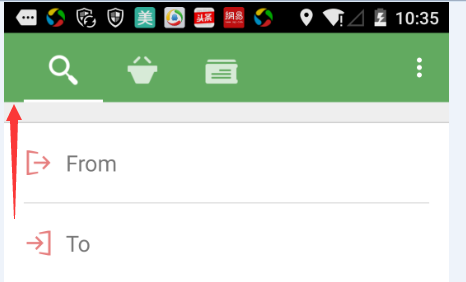
为了去掉这个间距,我们可以在style中添加如下代码:
<style name="Widget.ToolBar" parent="@style/Widget.AppCompat.Toolbar">
        <item name="maxButtonHeight">?actionBarSize</item>
</style>

<style name="Widget.ToolBar.NoInset" parent="@style/Widget.ToolBar">
        <item name="contentInsetStart">0.0dip</item>
</style>

<style name="Theme.CapitaineTrain.EmptyActionBar.NoInset" parent="@style/Theme.CapitaineTrain.EmptyActionBar">
        <item name="toolbarStyle">@style/Widget.ToolBar.NoInset</item>
</style>
主要是contentInsetStart属性。通过以上代码我们可以实现导航栏切换的效果。接下来我们来实现点击输入框时候的动画效果。
2、动画的实现
动画实现主要涉及到以下几个核心的知识点。
(1)通过ViewPropertyAnimator来实现动画;
(2)动画需要手动计算开始和结束的位置,先通过View#getDrawingRect(Rect)计算view在父坐标系中的位置,然后通过ViewGroup#offsetDescendantRectToMyCoords(View, Rect)来计算在根视图(按作者的说法是ancestor coordinate system)中的位置;
(3)通过AnimatorListenerAdapter来优化动画。
上代码,SearchFragment类
/**
 * Copyright (c) www.longdw.com
 */
package com.ldw.capitainetrain.ui;

import android.animation.TimeInterpolator;
import android.content.Context;
import android.graphics.Rect;
import android.os.Bundle;
import android.support.v4.app.Fragment;
import android.support.v7.app.ActionBarActivity;
import android.support.v7.view.ActionMode;
import android.view.LayoutInflater;
import android.view.Menu;
import android.view.MenuItem;
import android.view.View;
import android.view.View.OnClickListener;
import android.view.ViewGroup;
import android.view.animation.DecelerateInterpolator;
import android.view.inputmethod.InputMethodManager;
import android.widget.Button;
import android.widget.EditText;
import android.widget.FrameLayout;
import android.widget.LinearLayout;
import android.widget.TextView;

import com.ldw.capitainetrain.R;
import com.ldw.capitainetrain.anim.CustomAnimator;
import com.ldw.capitainetrain.anim.LayerEnablingAnimatorListener;

public class SearchFragment extends Fragment implements OnClickListener {

    private TimeInterpolator ANIMATION_INTERPOLATOR = new DecelerateInterpolator();
    private int ANIMATION_DURATION = 500;
    private TextView mOutwardTv;
    private TextView mInwardTv;
    private FrameLayout mMainContainer;

    private LinearLayout mDateTimeContainer;
    private LinearLayout mStationsContainer;
    private FrameLayout mFirstSpacer;
    private FrameLayout mSencondSpacer;

    private LinearLayout mPassengersContainer;
    private FrameLayout mThirdSpacer;
    private Button mSearchBtn;
    private int mHalfHeight;

    private FrameLayout mEditorLayout;
    private CustomAnimator mAnimator;

    private Button mArrivalBtn;
    private Button mDepatureBtn;
    private EditText mDepatureEt;
    private EditText mArrivalEt;

    private int mCurrentSelectedViewId;

    private InputMethodManager mInputManager;

    @Override
    public View onCreateView(LayoutInflater inflater, ViewGroup container,
            Bundle savedInstanceState) {

        final View view = inflater
                .inflate(R.layout.fragment_search, container, false);

        mAnimator = new CustomAnimator(getActivity());
        mInputManager = (InputMethodManager) getActivity().getSystemService(Context.INPUT_METHOD_SERVICE);

        view.addOnLayoutChangeListener(new View.OnLayoutChangeListener() {
            @Override
            public void onLayoutChange(View v, int left, int top, int right,
                    int bottom, int oldLeft, int oldTop, int oldRight,
                    int oldBottom) {
                v.removeOnLayoutChangeListener(this);
                mHalfHeight = view.getHeight() / 2;

                mEditorLayout.setTranslationY(mHalfHeight);
                mEditorLayout.setAlpha(0f);

                mAnimator.setEditModeHalfHeight(mHalfHeight);
            }
        });

        initView(view);

        getFragmentManager().beginTransaction().add(R.id.edit_mode_fragment_container, new OtherFragment()).commit();

        return view;
    }

    private void initView(View view) {
        mOutwardTv = (TextView) view.findViewById(R.id.outward);
        mOutwardTv.setOnClickListener(this);
        mInwardTv = (TextView) view.findViewById(R.id.inward);
        mInwardTv.setOnClickListener(this);

        mMainContainer = (FrameLayout) view.findViewById(R.id.main_container);
        mStationsContainer = (LinearLayout) view
                .findViewById(R.id.stations_container);
        mDateTimeContainer = (LinearLayout) view
                .findViewById(R.id.date_time_container);
        mFirstSpacer = (FrameLayout) view.findViewById(R.id.first_spacer);
        mSencondSpacer = (FrameLayout) view.findViewById(R.id.second_spacer);

        mPassengersContainer = (LinearLayout) view
                .findViewById(R.id.passengers_container);
        mThirdSpacer = (FrameLayout) view.findViewById(R.id.third_spacer);
        mSearchBtn = (Button) view.findViewById(R.id.btn_search);

        mEditorLayout = (FrameLayout) view.findViewById(R.id.edit_mode_container);

        //From
        mDepatureBtn = (Button) view.findViewById(R.id.btn_departure);
        mDepatureBtn.setOnClickListener(this);
        mDepatureEt = (EditText) view.findViewById(R.id.depature_et);
        //To
        mArrivalBtn = (Button) view.findViewById(R.id.btn_arrival);
        mArrivalBtn.setOnClickListener(this);
        mArrivalEt = (EditText) view.findViewById(R.id.arrival_et);
    }

    @Override
    public void onClick(View v) {

        if (v == mDepatureBtn) {
            focusOn(mDepatureBtn, mStationsContainer, true);
            focusOn(mDepatureBtn, mDateTimeContainer, true);
            focusOn(mDepatureBtn, mSencondSpacer, true);
            stickTo(mFirstSpacer, mDepatureBtn, true);
            fadeOutToBottom(mPassengersContainer, true);
            fadeOutToBottom(mSearchBtn, true);
            fadeOutToBottom(mThirdSpacer, true);
            slideInToTop(mEditorLayout, true);
            mEditorLayout.setVisibility(View.VISIBLE);

            mDepatureBtn.setVisibility(View.GONE);
            mDepatureEt.setClickable(true);
            mDepatureEt.setFocusable(true);
            mDepatureEt.setFocusableInTouchMode(true);
            mDepatureEt.requestFocus();
            mInputManager.toggleSoftInput(0, InputMethodManager.HIDE_NOT_ALWAYS);

        } else if (v == mArrivalBtn) {

            focusOn(mArrivalBtn, mStationsContainer, true);
            focusOn(mArrivalBtn, mDateTimeContainer, true);
            focusOn(mDepatureBtn, mSencondSpacer, true);
            stickTo(mFirstSpacer, mArrivalBtn, true);
            fadeOutToBottom(mPassengersContainer, true);
            fadeOutToBottom(mSearchBtn, true);
            fadeOutToBottom(mThirdSpacer, true);
            slideInToTop(mEditorLayout, true);
            mEditorLayout.setVisibility(View.VISIBLE);

            mArrivalBtn.setVisibility(View.GONE);
            mArrivalEt.setClickable(true);
            mArrivalEt.setFocusable(true);
            mArrivalEt.setFocusableInTouchMode(true);
            mArrivalEt.requestFocus();
            mInputManager.toggleSoftInput(0, InputMethodManager.HIDE_NOT_ALWAYS);

        } else if (v == mOutwardTv) {
            focusOn(mOutwardTv, mStationsContainer, true);
            focusOn(mOutwardTv, mDateTimeContainer, true);
            focusOn(mOutwardTv, mFirstSpacer, true);
            stickTo(mSencondSpacer, mOutwardTv, true);
            fadeOutToBottom(mPassengersContainer, true);
            fadeOutToBottom(mSearchBtn, true);
            fadeOutToBottom(mThirdSpacer, true);
            slideInToTop(mEditorLayout, true);
            mEditorLayout.setVisibility(View.VISIBLE);
        } else if(v == mInwardTv) {

            focusOn(mInwardTv, mStationsContainer, true);
            focusOn(mInwardTv, mDateTimeContainer, true);
            focusOn(mInwardTv, mFirstSpacer, true);
            stickTo(mSencondSpacer, mInwardTv, true);
            fadeOutToBottom(mPassengersContainer, true);
            fadeOutToBottom(mSearchBtn, true);
            fadeOutToBottom(mThirdSpacer, true);
            slideInToTop(mEditorLayout, true);
            mEditorLayout.setVisibility(View.VISIBLE);
        }
        mCurrentSelectedViewId = v.getId();
        ((ActionBarActivity)getActivity()).startSupportActionMode(mCallback);
    }

    private final Rect mTmpRect = new Rect();

    private void focusOn(View v, View movableView, boolean animated) {

        v.getDrawingRect(mTmpRect);
        mMainContainer.offsetDescendantRectToMyCoords(v, mTmpRect);

        movableView.animate().
                translationY(-mTmpRect.top).
                setDuration(animated ? ANIMATION_DURATION : 0).
                setInterpolator(ANIMATION_INTERPOLATOR).
                setListener(new LayerEnablingAnimatorListener(movableView)).
                start();
    }

    private void unfocus(View v, View movableView, boolean animated) {
        movableView.animate().
                translationY(0).
                setDuration(animated ? ANIMATION_DURATION : 0).
                setInterpolator(ANIMATION_INTERPOLATOR).
                setListener(new LayerEnablingAnimatorListener(movableView)).
                start();
    }

    private void fadeOutToBottom(View v, boolean animated) {
        v.animate().
                translationYBy(mHalfHeight).
                alpha(0).
                setDuration(animated ? ANIMATION_DURATION : 0).
                setInterpolator(ANIMATION_INTERPOLATOR).
                setListener(new LayerEnablingAnimatorListener(v)).
                start();
    }

    private void fadeInToTop(View v, boolean animated) {
        v.animate().
                translationYBy(-mHalfHeight).
                alpha(1).
                setDuration(animated ? ANIMATION_DURATION : 0).
                setInterpolator(ANIMATION_INTERPOLATOR).
                setListener(new LayerEnablingAnimatorListener(v)).
                start();
    }

    private void slideInToTop(View v, boolean animated) {
        v.animate().
                translationY(0).
                alpha(1).
                setDuration(animated ? ANIMATION_DURATION : 0).
                setListener(new LayerEnablingAnimatorListener(v)).
                setInterpolator(ANIMATION_INTERPOLATOR);
    }

    private void slideOutToBottom(View v, boolean animated) {
        v.animate().
                translationY(mHalfHeight * 2).
                alpha(0).
                setDuration(animated ? ANIMATION_DURATION : 0).
                setListener(new LayerEnablingAnimatorListener(v)).
                setInterpolator(ANIMATION_INTERPOLATOR);
    }

    private void stickTo(View v, View viewToStickTo, boolean animated) {
        v.getDrawingRect(mTmpRect);
        mMainContainer.offsetDescendantRectToMyCoords(v, mTmpRect);

        v.animate().
                translationY(viewToStickTo.getHeight() - mTmpRect.top).
                setDuration(animated ? ANIMATION_DURATION : 0).
                setInterpolator(ANIMATION_INTERPOLATOR).
                start();
    }

    private void unstickFrom(View v, View viewToStickTo, boolean animated) {
        v.animate().
                translationY(0).
                setDuration(animated ? ANIMATION_DURATION : 0).
                setInterpolator(ANIMATION_INTERPOLATOR).
                setListener(new LayerEnablingAnimatorListener(viewToStickTo)).
                start();
    }

    private ActionMode.Callback mCallback = new ActionMode.Callback() {

        @Override
        public boolean onPrepareActionMode(ActionMode mode, Menu menu) {

            mode.setTitle("From");

            return false;
        }

        @Override
        public void onDestroyActionMode(ActionMode mode) {

            slideOutToBottom(mEditorLayout, true);

            switch (mCurrentSelectedViewId) {
            case R.id.btn_departure:
                unstickFrom(mFirstSpacer, mDepatureBtn, true);
                fadeInToTop(mPassengersContainer, true);
                fadeInToTop(mSearchBtn, true);
                fadeInToTop(mThirdSpacer, true);
                unfocus(mDepatureBtn, mStationsContainer, true);
                unfocus(mDepatureBtn, mDateTimeContainer, true);
                unfocus(mDepatureBtn, mSencondSpacer, true);

                mDepatureEt.setClickable(false);
                mDepatureEt.setFocusable(false);
                mDepatureBtn.setVisibility(View.VISIBLE);
                mInputManager.hideSoftInputFromWindow(mDepatureEt.getWindowToken(), 0);
                break;
            case R.id.btn_arrival:
                unstickFrom(mFirstSpacer, mArrivalBtn, true);
                fadeInToTop(mPassengersContainer, true);
                fadeInToTop(mSearchBtn, true);
                fadeInToTop(mThirdSpacer, true);
                unfocus(mArrivalBtn, mStationsContainer, true);
                unfocus(mArrivalBtn, mDateTimeContainer, true);
                unfocus(mArrivalBtn, mSencondSpacer, true);

                mArrivalEt.setClickable(false);
                mArrivalEt.setFocusable(false);
                mArrivalBtn.setVisibility(View.VISIBLE);
                mInputManager.hideSoftInputFromWindow(mArrivalEt.getWindowToken(), 0);
                break;
            case R.id.outward:

                unstickFrom(mSencondSpacer, mOutwardTv, true);
                fadeInToTop(mPassengersContainer, true);
                fadeInToTop(mSearchBtn, true);
                fadeInToTop(mThirdSpacer, true);
                unfocus(mOutwardTv, mStationsContainer, true);
                unfocus(mOutwardTv, mDateTimeContainer, true);
                unfocus(mOutwardTv, mFirstSpacer, true);

                break;
            case R.id.inward:

                unstickFrom(mSencondSpacer, mInwardTv, true);
                fadeInToTop(mPassengersContainer, true);
                fadeInToTop(mSearchBtn, true);
                fadeInToTop(mThirdSpacer, true);
                unfocus(mInwardTv, mStationsContainer, true);
                unfocus(mInwardTv, mDateTimeContainer, true);
                unfocus(mInwardTv, mFirstSpacer, true);

                break;
            }
        }

        @Override
        public boolean onCreateActionMode(ActionMode mode, Menu menu) {
//			mode.getMenuInflater().inflate(R.menu.main, menu);
            //此处要返回true
            return true;
//			return false;
        }

        @Override
        public boolean onActionItemClicked(ActionMode mode, MenuItem item) {

            return false;
        }
    };
}
fragment_search.xml
<?xml version="1.0" encoding="utf-8"?>
<FrameLayout xmlns:android="http://schemas.android.com/apk/res/android"
android:id="@+id/main_container"
android:layout_width="match_parent"
android:layout_height="match_parent" >
<ScrollView
android:id="@+id/normal_mode_container"
style="@style/Form"
android:layout_width="match_parent"
android:layout_height="match_parent"
android:fillViewport="true"
android:paddingBottom="0.0dip"
android:paddingTop="0.0dip" >
<RelativeLayout
android:id="@+id/form_container"
android:layout_width="match_parent"
android:layout_height="wrap_content"
android:clipToPadding="false"
android:orientation="vertical"
android:paddingBottom="@dimen/spacing_large" >
<LinearLayout
android:id="@+id/stations_container"
android:layout_width="match_parent"
android:layout_height="wrap_content"
android:layout_marginTop="@dimen/spacing_large"
android:background="@color/ct_white"
android:orientation="vertical" >
<View
android:layout_width="match_parent"
android:layout_height="@dimen/divider_section_top"
android:layout_gravity="top"
android:background="@drawable/divider_section_top" />
<RelativeLayout
android:layout_width="match_parent"
android:layout_height="wrap_content" >
<ImageView
android:id="@+id/departure_icon"
android:layout_width="wrap_content"
android:layout_height="@dimen/form_field_height"
android:layout_alignParentLeft="true"
android:layout_alignParentTop="true"
android:paddingLeft="@dimen/spacing_large"
android:scaleType="center"
android:src="@drawable/ic_search_from" />
<ImageView
android:id="@+id/arrival_icon"
android:layout_width="wrap_content"
android:layout_height="@dimen/form_field_height"
android:layout_alignParentLeft="true"
android:layout_below="@id/departure_icon"
android:layout_marginTop="@dimen/divider_medium"
android:paddingLeft="@dimen/spacing_large"
android:scaleType="center"
android:src="@drawable/ic_search_to" />
<FrameLayout
android:id="@+id/departure"
android:layout_width="match_parent"
android:layout_height="@dimen/form_field_height" >
<LinearLayout
android:id="@+id/departure_search_view"
android:layout_width="match_parent"
android:layout_height="match_parent"
android:orientation="horizontal" >
<EditText
android:id="@+id/depature_et"
android:layout_width="match_parent"
android:layout_height="match_parent"
android:background="@null"
android:clickable="false"
android:focusable="false"
android:hint="@string/ui_android_search_departure"
android:layout_marginLeft="50dip" />
</LinearLayout>
<Button
android:id="@+id/btn_departure"
android:layout_width="match_parent"
android:layout_height="match_parent"
android:background="@null" />
</FrameLayout>
<View
android:id="@+id/stations_container_divider"
android:layout_width="match_parent"
android:layout_height="@dimen/divider_medium"
android:layout_below="@id/departure"
android:layout_marginLeft="@dimen/spacing_large"
android:layout_marginRight="@dimen/spacing_large"
android:background="@drawable/divider_medium" />
<FrameLayout
android:id="@+id/arrival"
android:layout_width="match_parent"
android:layout_height="@dimen/form_field_height"
android:layout_below="@id/stations_container_divider" >
<LinearLayout
android:id="@+id/arrival_search_view"
android:layout_width="match_parent"
android:layout_height="match_parent"
android:orientation="horizontal" >
<EditText
android:id="@+id/arrival_et"
android:layout_width="match_parent"
android:layout_height="match_parent"
android:layout_marginLeft="50dip"
android:background="@null"
android:clickable="false"
android:focusable="false"
android:hint="@string/ui_android_search_arrival" />
</LinearLayout>
<Button
android:id="@+id/btn_arrival"
android:layout_width="match_parent"
android:layout_height="match_parent"
android:background="@null" />
</FrameLayout>
<ImageButton
android:id="@+id/btn_swap_stations"
android:layout_width="@dimen/grid_size_medium"
android:layout_height="@dimen/grid_size_medium"
android:layout_alignParentRight="true"
android:layout_centerVertical="true"
android:background="@null"
android:scaleType="center"
android:src="@drawable/ic_search_swap_stations"
android:visibility="gone" />
</RelativeLayout>
</LinearLayout>
<FrameLayout
android:id="@+id/first_spacer"
android:layout_width="match_parent"
android:layout_height="@dimen/form_field_height"
android:layout_below="@id/stations_container"
android:background="@color/app_background" >
<View
android:layout_width="match_parent"
android:layout_height="@dimen/divider_section_bottom"
android:layout_gravity="top"
android:background="@drawable/divider_section_bottom" />
</FrameLayout>
<LinearLayout
android:id="@+id/date_time_container"
android:layout_width="match_parent"
android:layout_height="wrap_content"
android:layout_below="@id/stations_container"
android:layout_marginTop="@dimen/spacing_large"
android:background="@color/ct_white"
android:orientation="vertical" >
<View
android:layout_width="match_parent"
android:layout_height="@dimen/divider_section_top"
android:layout_gravity="top"
android:background="@drawable/divider_section_top" />
<LinearLayout
android:layout_width="match_parent"
android:layout_height="wrap_content"
android:divider="@drawable/divider_medium"
android:dividerPadding="@dimen/spacing_large"
android:orientation="vertical"
android:showDividers="middle" >
<TextView
android:id="@+id/outward"
android:layout_width="match_parent"
android:layout_height="@dimen/form_field_height"
android:drawableLeft="@drawable/ic_search_outward"
android:drawablePadding="@dimen/spacing_medium"
android:ellipsize="end"
android:gravity="center_vertical"
android:hint="@string/ui_android_search_departureDate"
android:paddingLeft="@dimen/spacing_large"
android:paddingRight="@dimen/spacing_large"
android:singleLine="true"
android:textSize="@dimen/font_size_medium" />
<LinearLayout
android:layout_width="match_parent"
android:layout_height="@dimen/form_field_height"
android:orientation="horizontal" >
<TextView
android:id="@+id/inward"
android:layout_width="0.0dip"
android:layout_height="match_parent"
android:layout_weight="1.0"
android:drawableLeft="@drawable/ic_search_inward"
android:drawablePadding="@dimen/spacing_medium"
android:ellipsize="end"
android:gravity="center_vertical"
android:hint="@string/ui_android_search_oneWay"
android:paddingLeft="@dimen/spacing_large"
android:paddingRight="@dimen/spacing_large"
android:singleLine="true"
android:textSize="@dimen/font_size_medium" />
<ImageButton
android:id="@+id/inward_clear_button"
android:layout_width="48.0dip"
android:layout_height="match_parent"
android:background="@drawable/_selector_light"
android:src="@drawable/ic_search_view_clear"
android:visibility="gone" />
</LinearLayout>
</LinearLayout>
</LinearLayout>
<FrameLayout
android:id="@+id/second_spacer"
android:layout_width="match_parent"
android:layout_height="@dimen/form_field_height"
android:layout_below="@id/date_time_container"
android:background="@color/app_background" >
<View
android:layout_width="match_parent"
android:layout_height="@dimen/divider_section_bottom"
android:layout_gravity="top"
android:background="@drawable/divider_section_bottom" />
</FrameLayout>
<LinearLayout
android:id="@+id/passengers_container"
android:layout_width="match_parent"
android:layout_height="wrap_content"
android:layout_below="@id/date_time_container"
android:layout_marginTop="@dimen/spacing_large"
android:background="@color/ct_white"
android:orientation="vertical" >
<View
android:layout_width="match_parent"
android:layout_height="@dimen/divider_section_top"
android:layout_gravity="top"
android:background="@drawable/divider_section_top" />
<LinearLayout
android:layout_width="match_parent"
android:layout_height="@dimen/form_field_height"
android:orientation="horizontal" >
<TextView
android:id="@+id/passengers"
android:layout_width="0.0dip"
android:layout_height="match_parent"
android:layout_weight="1.0"
android:drawableLeft="@drawable/ic_search_passengers"
android:drawablePadding="@dimen/spacing_medium"
android:ellipsize="end"
android:gravity="center_vertical"
android:hint="@string/ui_android_search_noPassengersSelected"
android:paddingLeft="@dimen/spacing_large"
android:paddingRight="@dimen/spacing_small"
android:singleLine="true"
android:textSize="@dimen/font_size_medium" />
<ImageButton
android:id="@+id/passengers_clear_button"
android:layout_width="48.0dip"
android:layout_height="match_parent"
android:background="@drawable/_selector_light"
android:src="@drawable/ic_search_view_clear"
android:visibility="gone" />
</LinearLayout>
</LinearLayout>
<FrameLayout
android:id="@+id/third_spacer"
android:layout_width="match_parent"
android:layout_height="@dimen/form_field_height"
android:layout_below="@id/passengers_container"
android:background="@color/app_background" >
<View
android:layout_width="match_parent"
android:layout_height="@dimen/divider_section_bottom"
android:layout_gravity="top"
android:background="@drawable/divider_section_bottom" />
</FrameLayout>
<Button
android:id="@+id/btn_search"
style="@style/Button.Action.Green"
android:layout_width="match_parent"
android:layout_height="wrap_content"
android:layout_below="@+id/passengers_container"
android:layout_marginLeft="@dimen/inset_horizontal_action_button"
android:layout_marginRight="@dimen/inset_horizontal_action_button"
android:layout_marginTop="@dimen/spacing_large"
android:background="@drawable/btn_green"
android:text="@string/ui_android_search_searchAction" />
</RelativeLayout>
</ScrollView>
<FrameLayout
android:id="@+id/edit_mode_container"
android:layout_width="match_parent"
android:layout_height="match_parent"
android:paddingTop="@dimen/form_field_height"
android:visibility="invisible" >
<LinearLayout
android:layout_width="match_parent"
android:layout_height="match_parent"
android:clickable="true"
android:orientation="vertical"
android:paddingTop="@dimen/spacing_large" >
<View
android:layout_width="match_parent"
android:layout_height="@dimen/divider_section_top"
android:layout_gravity="top"
android:layout_marginLeft="@dimen/inset_horizontal_content"
android:layout_marginRight="@dimen/inset_horizontal_content"
android:background="@drawable/divider_section_top" />
<FrameLayout
android:id="@+id/edit_mode_fragment_container"
android:layout_width="match_parent"
android:layout_height="match_parent" />
</LinearLayout>
</FrameLayout>
</FrameLayout>
以上就是我实现的过程。最后以Cyrial的话做个总结:
With the introduction of the new property-based animation framework and Fragments in Android 3.0, the framework provides developers with all the necessary tools to create wonderful and meaningful UIs while still keeping a maintainable and modularized code. Animating Fragments is generally a single ViewPropertyHolder API call away and may drastically improve the way users understand your application. Designing an application is not only about creating a nice static design. It is also about moving graphical elements in a way it is meaningful to users. Transitions both give life to an application and enrich user experience.
大牛你好~~~
有款应用 叫做Morning Routine ,大部分都是5.0以后Material Design 的效果,可以看下 ,非常好
感谢指导,马上下个瞧瞧
感谢指导,我马上下载个看看
怎么没有源码下载?
网站不错!