最近研究了下系统的music源码,随便看了下,里面有很多东西值得我们去学习的。在研究过程中看到了源码中的TrackBrowserActivity类实现了listview的拖拽功能,就想单独拿出来看看怎么实现的。
网上其实也有很多拖拽listview的实现,但感觉效果还是不如music中的好。闲话不说,先上效果图,后上代码。
效果图:
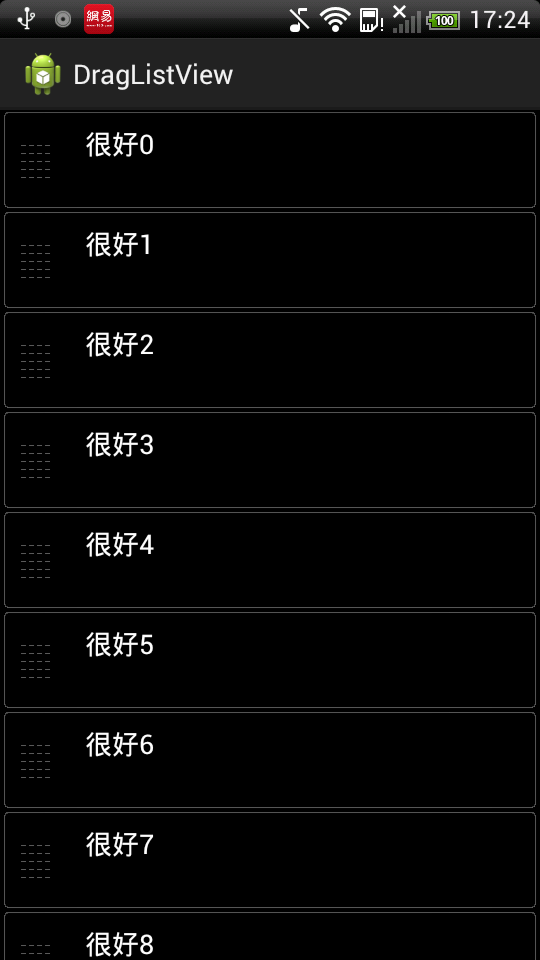
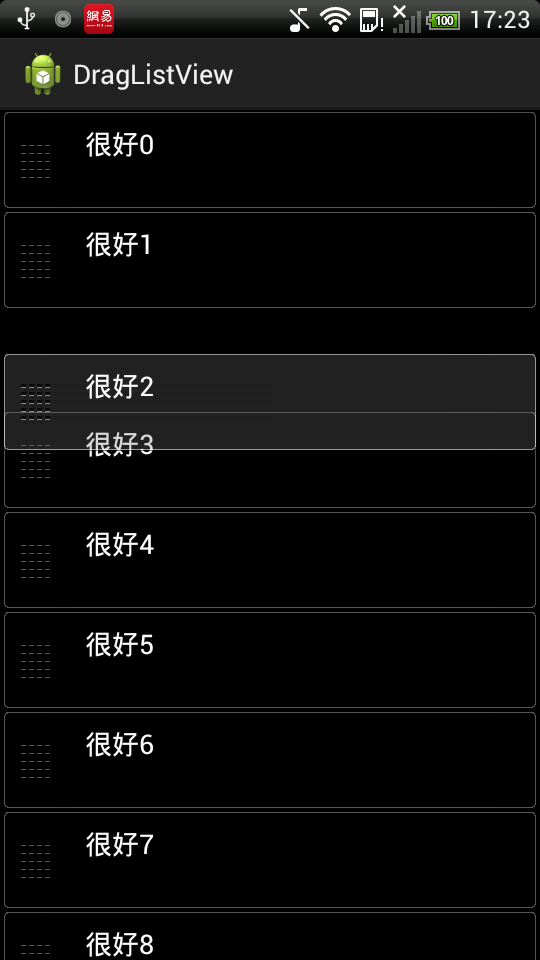
1、music中实现拖拽的核心代码,基本没做什么修改,就是加了些个人理解后的注释和调试过程中的打印语句,TouchInterceptor类:
/*
 * Copyright (C) 2008 The Android Open Source Project
 *
 * Licensed under the Apache License, Version 2.0 (the "License");
 * you may not use this file except in compliance with the License.
 * You may obtain a copy of the License at
 *
 *      http://www.apache.org/licenses/LICENSE-2.0
 *
 * Unless required by applicable law or agreed to in writing, software
 * distributed under the License is distributed on an "AS IS" BASIS,
 * WITHOUT WARRANTIES OR CONDITIONS OF ANY KIND, either express or implied.
 * See the License for the specific language governing permissions and
 * limitations under the License.
 */

package ldw.listview;

import android.content.Context;
import android.content.SharedPreferences;
import android.content.res.Resources;
import android.graphics.Bitmap;
import android.graphics.PixelFormat;
import android.graphics.Rect;
import android.graphics.drawable.Drawable;
import android.graphics.drawable.LevelListDrawable;
import android.util.AttributeSet;
import android.util.Log;
import android.view.GestureDetector;
import android.view.Gravity;
import android.view.MotionEvent;
import android.view.View;
import android.view.ViewConfiguration;
import android.view.ViewGroup;
import android.view.WindowManager;
import android.view.GestureDetector.SimpleOnGestureListener;
import android.widget.AdapterView;
import android.widget.ImageView;
import android.widget.ListView;

public class TouchInterceptor extends ListView {

	private ImageView mDragView;
	private WindowManager mWindowManager;
	private WindowManager.LayoutParams mWindowParams;
	/**
	 * At which position is the item currently being dragged. Note that this
	 * takes in to account header items.
	 */
	private int mDragPos;
	/**
	 * At which position was the item being dragged originally
	 */
	private int mSrcDragPos;
	private int mDragPointX; // at what x offset inside the item did the user
								// grab it
	private int mDragPointY; // at what y offset inside the item did the user
								// grab it
	private int mXOffset; // the difference between screen coordinates and
							// coordinates in this view
	private int mYOffset; // the difference between screen coordinates and
							// coordinates in this view
	private DragListener mDragListener;
	private DropListener mDropListener;
	private RemoveListener mRemoveListener;
	private int mUpperBound;
	private int mLowerBound;
	private int mHeight;
	private GestureDetector mGestureDetector;
	private static final int FLING = 0;
	private static final int SLIDE = 1;
	private static final int TRASH = 2;
	private int mRemoveMode = -1;
	private Rect mTempRect = new Rect();
	private Bitmap mDragBitmap;
	private final int mTouchSlop;
	private int mItemHeightNormal;
	private int mItemHeightExpanded;
	private int mItemHeightHalf;
	private Drawable mTrashcan;

	public TouchInterceptor(Context context, AttributeSet attrs) {
		super(context, attrs);
		SharedPreferences pref = context.getSharedPreferences("Music", 3);
		mRemoveMode = pref.getInt("deletemode", -1);
		mTouchSlop = ViewConfiguration.get(context).getScaledTouchSlop();
		Resources res = getResources();
		mItemHeightNormal = res.getDimensionPixelSize(R.dimen.normal_height);
		mItemHeightHalf = mItemHeightNormal / 2;
		mItemHeightExpanded = res
				.getDimensionPixelSize(R.dimen.expanded_height);
	}

	@Override
	public boolean onInterceptTouchEvent(MotionEvent ev) {
		if (mRemoveListener != null && mGestureDetector == null) {
			if (mRemoveMode == FLING) {
				mGestureDetector = new GestureDetector(getContext(),
						new SimpleOnGestureListener() {
							@Override
							public boolean onFling(MotionEvent e1,
									MotionEvent e2, float velocityX,
									float velocityY) {
								if (mDragView != null) {
									if (velocityX > 1000) {
										Rect r = mTempRect;
										mDragView.getDrawingRect(r);
										if (e2.getX() > r.right * 2 / 3) {
											// fast fling right with release
											// near the right edge of the screen
											stopDragging();
											mRemoveListener.remove(mSrcDragPos);
											unExpandViews(true);
										}
									}
									// flinging while dragging should have no
									// effect
									return true;
								}
								return false;
							}
						});
			}
		}
		//getX是以widget左上角为坐标原点计算的
		//getRawX是以屏幕左上角为原点计算的
		if (mDragListener != null || mDropListener != null) {
			switch (ev.getAction()) {
			case MotionEvent.ACTION_DOWN:
				int x = (int) ev.getX();
				int y = (int) ev.getY();
				int itemnum = pointToPosition(x, y);
				if (itemnum == AdapterView.INVALID_POSITION) {
					break;
				}
				int first = getFirstVisiblePosition();
				ViewGroup item = (ViewGroup) getChildAt(itemnum - first);
				mDragPointX = x - item.getLeft();
				mDragPointY = y - item.getTop();
				mXOffset = ((int) ev.getRawX()) - x;
				mYOffset = ((int) ev.getRawY()) - y;
//				System.out.println("++++++==============");
				// The left side of the item is the grabber for dragging the
				// item
				if (x < 64) {
					item.setDrawingCacheEnabled(true);
					// Create a copy of the drawing cache so that it does not
					// get recycled
					// by the framework when the list tries to clean up memory
					Bitmap bitmap = Bitmap.createBitmap(item.getDrawingCache());

					startDragging(bitmap, x, y);
					mDragPos = itemnum;
					mSrcDragPos = mDragPos;
					mHeight = getHeight();
					int touchSlop = mTouchSlop;
					mUpperBound = Math.min(y - touchSlop, mHeight / 3);
					mLowerBound = Math.max(y + touchSlop, mHeight * 2 / 3);
					System.out.println("mDragPos--->" + mDragPos
							+ "  mHeight--->" + mHeight + "  mUpperBound--->"
							+ mUpperBound + "  mLowerBound--->" + mLowerBound);
					return false;
				}
				stopDragging();
				break;
			}
		}
		return super.onInterceptTouchEvent(ev);
	}

	/*
	 * pointToPosition() doesn't consider invisible views, but we need to, so
	 * implement a slightly different version.
	 */
	private int myPointToPosition(int x, int y) {

		if (y < 0) {
			// when dragging off the top of the screen, calculate position
			// by going back from a visible item
			int pos = myPointToPosition(x, y + mItemHeightNormal);
			if (pos > 0) {
				return pos - 1;
			}
		}

		Rect frame = mTempRect;
		final int count = getChildCount();
		for (int i = count - 1; i >= 0; i--) {
			final View child = getChildAt(i);
			child.getHitRect(frame);
			if (frame.contains(x, y)) {
				return getFirstVisiblePosition() + i;
			}
		}
		return INVALID_POSITION;
	}

	private int getItemForPosition(int y) {
		//如果只是点击item的左侧还没有开始drag的时候 y-mDragPointY实际上是表示item.getTop(),也就是该item距离顶部多少
		//但是y随着手机的移动在变化 相当于y1 + (y - mDragPointY)
		//当没有发生拖拽的时候 y1=0, 这样就相当于在计算y1-mItemHeightHalf
		int adjustedy = y - mDragPointY - mItemHeightHalf;
//		System.out.println(adjustedy+"============");
		int pos = myPointToPosition(0, adjustedy);
		if (pos >= 0) {
//			System.out.println("pos--->"+pos+"  mSrcDragPos--->"+mSrcDragPos);
			if (pos <= mSrcDragPos) {
				pos += 1;
			}
		} else if (adjustedy < 0) {
			// this shouldn't happen anymore now that myPointToPosition deals
			// with this situation
			pos = 0;
		}
		return pos;
	}

	private void adjustScrollBounds(int y) {
		if (y >= mHeight / 3) {
			mUpperBound = mHeight / 3;
		}
		if (y <= mHeight * 2 / 3) {
			mLowerBound = mHeight * 2 / 3;
		}
	}

	/*
	 * Restore size and visibility for all listitems
	 */
	private void unExpandViews(boolean deletion) {
		for (int i = 0;; i++) {
			View v = getChildAt(i);
			if (v == null) {
				if (deletion) {
					// HACK force update of mItemCount
					int position = getFirstVisiblePosition();
					int y = getChildAt(0).getTop();
					setAdapter(getAdapter());
					setSelectionFromTop(position, y);
					// end hack
				}
				try {
					layoutChildren(); // force children to be recreated where
										// needed
					v = getChildAt(i);
				} catch (IllegalStateException ex) {
					// layoutChildren throws this sometimes, presumably because
					// we're
					// in the process of being torn down but are still getting
					// touch
					// events
				}
				if (v == null) {
					return;
				}
			}
			ViewGroup.LayoutParams params = v.getLayoutParams();
			params.height = mItemHeightNormal;
			v.setLayoutParams(params);
			v.setVisibility(View.VISIBLE);
		}
	}

	/*
	 * Adjust visibility and size to make it appear as though an item is being
	 * dragged around and other items are making room for it: If dropping the
	 * item would result in it still being in the same place, then make the
	 * dragged listitem's size normal, but make the item invisible. Otherwise,
	 * if the dragged listitem is still on screen, make it as small as possible
	 * and expand the item below the insert point. If the dragged item is not on
	 * screen, only expand the item below the current insertpoint.
	 */
	private void doExpansion() {
//		System.out.println("doExpansion---------------------************");
		int childnum = mDragPos - getFirstVisiblePosition();
//		System.out.println("mDragPos--->"+mDragPos+"  getFirstVisiblePosition()--->"+getFirstVisiblePosition());
		if (mDragPos > mSrcDragPos) {
			childnum++;
		}
		int numheaders = getHeaderViewsCount();

		View first = getChildAt(mSrcDragPos - getFirstVisiblePosition());
		for (int i = 0;; i++) {
			View vv = getChildAt(i);
			if (vv == null) {
				break;
			}

			int height = mItemHeightNormal;
			int visibility = View.VISIBLE;
			if (mDragPos < numheaders && i == numheaders) {
				// dragging on top of the header item, so adjust the item below
				// instead
				if (vv.equals(first)) {
					visibility = View.INVISIBLE;
				} else {
					height = mItemHeightExpanded;
				}
			} else if (vv.equals(first)) {
				// processing the item that is being dragged
				if (mDragPos == mSrcDragPos
						|| getPositionForView(vv) == getCount() - 1) {
					// hovering over the original location
					visibility = View.INVISIBLE;
				} else {
					// not hovering over it
					// Ideally the item would be completely gone, but neither
					// setting its size to 0 nor settings visibility to GONE
					// has the desired effect.
					//这地方的作用是:A和B两个item,A上B下,当A移动到可以和B互换位置的时候,A的高度设为1
					//这样B就自动跑上去了,此时A到了以前B的位置
					height = 1;
				}
			} else if (i == childnum) {
				if (mDragPos >= numheaders && mDragPos < getCount() - 1) {
					//后面height = mItemHeightExpanded; ABC三个item自上到下排列,A移动到B的位置
					//B由于在A的height设为1之后跑上面去了,那么C的height要求设置为2倍的item的高度才能保持不动
					height = mItemHeightExpanded;
				}
			}
			ViewGroup.LayoutParams params = vv.getLayoutParams();
			params.height = height;
			vv.setLayoutParams(params);
			vv.setVisibility(visibility);
		}
	}

	@Override
	public boolean onTouchEvent(MotionEvent ev) {
		if (mGestureDetector != null) {
			mGestureDetector.onTouchEvent(ev);
		}
		if ((mDragListener != null || mDropListener != null)
				&& mDragView != null) {
			int action = ev.getAction();
			switch (action) {
			case MotionEvent.ACTION_UP:
			case MotionEvent.ACTION_CANCEL:
				Rect r = mTempRect;
				mDragView.getDrawingRect(r);
				stopDragging();
				if (mRemoveMode == SLIDE && ev.getX() > r.right * 3 / 4) {
					if (mRemoveListener != null) {
						mRemoveListener.remove(mSrcDragPos);
					}
					unExpandViews(true);
				} else {
					if (mDropListener != null && mDragPos >= 0
							&& mDragPos < getCount()) {
						mDropListener.drop(mSrcDragPos, mDragPos);
					}
					unExpandViews(false);
				}
				break;

			case MotionEvent.ACTION_DOWN:
			case MotionEvent.ACTION_MOVE:
				int x = (int) ev.getX();
				int y = (int) ev.getY();
				dragView(x, y);
				int itemnum = getItemForPosition(y);
//				System.out.println("itemnum--->"+itemnum);
				if (itemnum >= 0) {
					if (action == MotionEvent.ACTION_DOWN
							|| itemnum != mDragPos) {
						if (mDragListener != null) {
							mDragListener.drag(mDragPos, itemnum);
						}
						mDragPos = itemnum;
						//该方法控制移动item的时候其他item的位置变化
						doExpansion();
					}
					int speed = 0;
					adjustScrollBounds(y);
					if (y > mLowerBound) {
						// scroll the list up a bit
						if (getLastVisiblePosition() < getCount() - 1) {
							speed = y > (mHeight + mLowerBound) / 2 ? 16 : 4;
						} else {
							speed = 1;
						}
					} else if (y < mUpperBound) {
						// scroll the list down a bit
						speed = y < mUpperBound / 2 ? -16 : -4;
						if (getFirstVisiblePosition() == 0
								&& getChildAt(0).getTop() >= getPaddingTop()) {
							// if we're already at the top, don't try to scroll,
							// because
							// it causes the framework to do some extra drawing
							// that messes
							// up our animation
							speed = 0;
						}
					}
					if (speed != 0) {
						//移动listview
						smoothScrollBy(speed, 30);
					}
				}
				break;
			}
			return true;
		}
		return super.onTouchEvent(ev);
	}

	private void startDragging(Bitmap bm, int x, int y) {
		stopDragging();

		mWindowParams = new WindowManager.LayoutParams();
		mWindowParams.gravity = Gravity.TOP | Gravity.LEFT;
		mWindowParams.x = x - mDragPointX + mXOffset;
		mWindowParams.y = y - mDragPointY + mYOffset;

		mWindowParams.height = WindowManager.LayoutParams.WRAP_CONTENT;
		mWindowParams.width = WindowManager.LayoutParams.WRAP_CONTENT;
		mWindowParams.flags = WindowManager.LayoutParams.FLAG_NOT_FOCUSABLE
				| WindowManager.LayoutParams.FLAG_NOT_TOUCHABLE
				| WindowManager.LayoutParams.FLAG_KEEP_SCREEN_ON
				| WindowManager.LayoutParams.FLAG_LAYOUT_IN_SCREEN
				| WindowManager.LayoutParams.FLAG_LAYOUT_NO_LIMITS;
		mWindowParams.format = PixelFormat.TRANSLUCENT;
		mWindowParams.windowAnimations = 0;

		Context context = getContext();
		ImageView v = new ImageView(context);
		// int backGroundColor =
		// context.getResources().getColor(R.color.dragndrop_background);
		// v.setBackgroundColor(backGroundColor);
		v.setBackgroundResource(R.drawable.playlist_tile_drag);
		v.setPadding(0, 0, 0, 0);
		v.setImageBitmap(bm);
		mDragBitmap = bm;

		mWindowManager = (WindowManager) context
				.getSystemService(Context.WINDOW_SERVICE);
		mWindowManager.addView(v, mWindowParams);
		mDragView = v;
	}

	private void dragView(int x, int y) {
		if (mRemoveMode == SLIDE) {
			float alpha = 1.0f;
			int width = mDragView.getWidth();
			if (x > width / 2) {
				alpha = ((float) (width - x)) / (width / 2);
			}
			mWindowParams.alpha = alpha;
		}

		if (mRemoveMode == FLING || mRemoveMode == TRASH) {
			mWindowParams.x = x - mDragPointX + mXOffset;
		} else {
			mWindowParams.x = 0;
		}
		mWindowParams.y = y - mDragPointY + mYOffset;
		mWindowManager.updateViewLayout(mDragView, mWindowParams);

		if (mTrashcan != null) {
			int width = mDragView.getWidth();
			if (y > getHeight() * 3 / 4) {
				mTrashcan.setLevel(2);
			} else if (width > 0 && x > width / 4) {
				mTrashcan.setLevel(1);
			} else {
				mTrashcan.setLevel(0);
			}
		}
	}

	private void stopDragging() {
		if (mDragView != null) {
			mDragView.setVisibility(GONE);
			WindowManager wm = (WindowManager) getContext().getSystemService(
					Context.WINDOW_SERVICE);
			wm.removeView(mDragView);
			mDragView.setImageDrawable(null);
			mDragView = null;
		}
		if (mDragBitmap != null) {
			mDragBitmap.recycle();
			mDragBitmap = null;
		}
		if (mTrashcan != null) {
			mTrashcan.setLevel(0);
		}
	}

	public void setTrashcan(Drawable trash) {
		mTrashcan = trash;
		mRemoveMode = TRASH;
	}

	public void setDragListener(DragListener l) {
		mDragListener = l;
	}

	public void setDropListener(DropListener l) {
		mDropListener = l;
	}

	public void setRemoveListener(RemoveListener l) {
		mRemoveListener = l;
	}

	public interface DragListener {
		void drag(int from, int to);
	}

	public interface DropListener {
		void drop(int from, int to);
	}

	public interface RemoveListener {
		void remove(int which);
	}
}
上面关键部分都写了注释,包括源码中自带的和我的个人理解加上去的,主要思路大概是这样的:当点击item的左侧,也就是代码中的x < 64的判断,表示开始要拖拽listview了,此时记录下一些后面会用到的变量、隐藏选中的item、使用WindowManager来显示浮动的view、重新设置listview中的item的高度等。主要用到的方法是:pointToPosition,根据x,y来确定点击的item。当然还有其他重要的方法,可以看代码的详细注释和如下草图。

2、MainActivity类
package ldw.listview;

import java.util.ArrayList;
import java.util.List;

import android.app.ListActivity;
import android.content.Context;
import android.os.Bundle;
import android.view.View;
import android.view.ViewGroup;
import android.widget.AbsListView;
import android.widget.AbsListView.OnScrollListener;
import android.widget.AdapterView;
import android.widget.ArrayAdapter;
import android.widget.TextView;

public class MainActivity extends ListActivity {

	private TouchInterceptor mListView;
	private ArrayList<String> list = new ArrayList<String>();
	private ArrayAdapter<String> adapter;

	@Override
	protected void onCreate(Bundle savedInstanceState) {
		super.onCreate(savedInstanceState);
		setContentView(R.layout.main);

		mListView = (TouchInterceptor) getListView();
		mListView.setSelector(R.drawable.list_selector_background);
		mListView.setBackgroundColor(0xff000000);
		mListView.setDropListener(mDropListener);
		mListView.setOnScrollListener(scrollListener);

		mListView
				.setOnItemLongClickListener(new AdapterView.OnItemLongClickListener() {

					@Override
					public boolean onItemLongClick(AdapterView<?> arg0,
							View arg1, int arg2, long arg3) {
						// TODO Auto-generated method stub
						return false;
					}
				});

		initData();

		adapter = new MyAdapter(this, R.layout.list_item, R.id.line1, list);

		// adapter = new SimpleAdapter(this, list, R.layout.list_item,
		// new String[] { "line1" }, new int[] { R.id.line1 });
		mListView.setAdapter(adapter);
	}

	private class MyAdapter extends ArrayAdapter<String> {

		public MyAdapter(Context context, int resource, int textViewResourceId,
				List<String> objects) {
			super(context, resource, textViewResourceId, objects);
		}

		@Override
		public View getView(int position, View convertView, ViewGroup parent) {
			if (convertView == null) {
				convertView = getLayoutInflater().inflate(R.layout.list_item,
						null);
			}
			TextView tv = (TextView) convertView.findViewById(R.id.line1);
			tv.setText(list.get(position));
			return convertView;
		}

	}

	private TouchInterceptor.DropListener mDropListener = new TouchInterceptor.DropListener() {
		public void drop(int from, int to) {

			String item = adapter.getItem(from);

			adapter.remove(item);
			adapter.insert(item, to);

			// for (String temp : list) {
			// System.out.println(temp);
			// }

			// adapter.notifyDataSetChanged();
			mListView.setAdapter(adapter);
			mListView.invalidateViews();
			mListView.setSelectionFromTop(scrollPos, scrollTop);
			// mListView.setSelection(first);
//			mListView.scrollTo(0, first);
//			System.out.println(from + "--------" + to);
		}
	};
	protected int scrollPos;
	protected int scrollTop;

	private void initData() {
		for (int i = 0; i < 20; i++) {
			list.add("很好" + i);
		}
	}

	private OnScrollListener scrollListener = new OnScrollListener() {

		@Override
		public void onScroll(AbsListView arg0, int arg1, int arg2, int arg3) {
		}

		@Override
		public void onScrollStateChanged(AbsListView view, int scrollState) {
			if (scrollState == OnScrollListener.SCROLL_STATE_IDLE) {
				// ListPos记录当前可见的List顶端的一行的位置
				scrollPos = mListView.getFirstVisiblePosition();
			}
			if (list != null) {
				View v = mListView.getChildAt(0);
				scrollTop = (v == null) ? 0 : v.getTop();
			}
		}
	};

}
MainActivity中主要代码是scrollListener监听类用于监听listview的滑动的顶端的item和位置,然后通过mListView.setSelectionFromTop(scrollPos, scrollTop);方法来实现拖拽过后listview的定位,因为每次拖拽完后使用setAdapter会让listview重新刷新然后定位到第一个item,有人肯定会问为什么不用notifyDataSetChanged方法,该方法试过了,可以很好的实现拖拽过后的定位,但是拖拽完后然后再点击被置换的那个item,会显示错乱,至今没有找到原因,估计是listview的drawingCache没有刷新的缘故吧。
下面附上源码
伟哥V5~完全看不懂。
跪求教育!